Bringing Playful Whimsy to Your Projects with Baby Bug
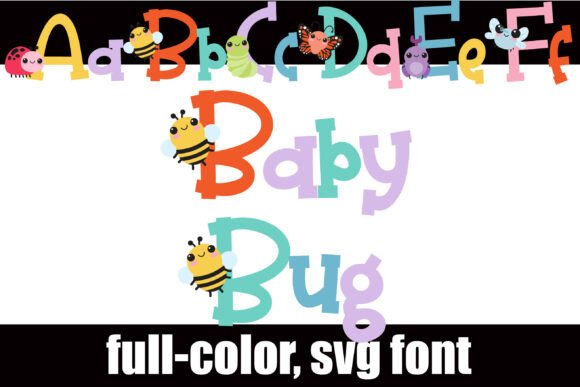
There are typefaces that simply convey words, and then there are typefaces that tell a story the moment you lay eyes on them. Baby Bug falls squarely into the latter category. It’s a full-color SVG font that feels less like a digital tool and more like a handcrafted piece of art. Imagine the familiar, sturdy elegance of a classic serif typeface, but with a delightful twist: nestled into the uppercase letters are charming, detailed illustrations of cute bugs. A ladybug perched on the curve of a 'B', a friendly caterpillar winding through the bowls of a 'P'. This isn't just a font; it's a personality injection for your design work.
A Font with Built-In Personality
What makes Baby Bug so compelling is its duality. At its core, it’s a serif font, which gives it a foundation of readability and traditional structure. However, the full-color illustrations transform it into a premier display font. The bugs aren't just tacked on; they are integrated with a crafty, whimsical aesthetic that feels intentional and cohesive. The color palette is vibrant yet harmonious, ensuring each letter is both a character and a tiny piece of illustration.
This premium font comes with a thoughtful feature for designers: an alternate color case. This means you aren't locked into a single color scheme for your bugs. Through your system's character map or, more accessibly for many crafters, through Silhouette's glyph map, you can access different color versions of each letter. This simple feature exponentially increases your creative control, allowing you to match the font perfectly to your project's color story without needing to edit the font file itself.
Where Baby Bug Truly Shines: Real-World Applications
Understanding a font's personality is one thing; knowing where to deploy it is where the real strategy comes in. Baby Bug isn't a workhorse for body copy in a legal document. Its strength lies in grabbing attention and setting a specific, joyful tone. Think of it as the headline act, not the background vocalist.
- Branding & Logo Design: For businesses targeting a family-friendly, whimsical, or nature-inspired audience, Baby Bug can be a cornerstone of a brand identity. It’s perfect for a children's boutique, a bakery specializing in decorated cookies, a gardening blog, or a toy store. It instantly communicates fun, creativity, and approachability.
- Publishing & Editorial Design: Use it for chapter titles in a children's book, the masthead of a craft magazine, or the cover of a whimsical novel. In editorial design, it can break the monotony of standard typography and inject personality into a layout.
- Packaging & Product Design: Imagine this font on a box of artisanal chocolates, a label for a honey brand, or packaging for craft supplies. It elevates a product from ordinary to memorable, turning the packaging itself into a part of the customer experience.
- Digital & Social Media: In the crowded space of social media, a creative font like Baby Bug stops the scroll. Use it for Instagram post titles, YouTube thumbnails, or website hero text for a blog. It creates immediate visual interest and helps content stand out in a feed. For web design, it’s a fantastic choice for hero banners or section headers where visual impact is key.
- Personal Projects & Crafting: This is where the font truly comes alive for hobbyists. It’s a dream for scrapbooking, creating custom invitations, designing party decorations, or making unique T-shirt designs with a cutting machine. The Silhouette glyph map integration makes it particularly accessible for the crafting community.
Making the Design Work: Practical Guidance
Integrating a specialized font like this requires a bit of thought to ensure it enhances, rather than overwhelms, your design. Here’s how to approach it practically.
Evaluating Project Fit and Readability
The first question is always about context. Is your project's tone playful, youthful, or whimsical? If yes, Baby Bug is a candidate. If the tone is corporate, serious, or minimalist, it’s likely not the right tool. Because it is a display font, readability is optimized at larger sizes. Use it for headlines, logos, and pull quotes. For body text, you will always need to pair it with a cleaner, more legible typeface. Think of Baby Bug as the accent, and your paired font as the foundation.
The Art of the Font Pairing
A successful font pairing creates contrast and hierarchy. Baby Bug’s playful serif style pairs beautifully with:
- A Clean Sans Serif: Fonts like Montserrat, Lato, or Open Sans provide a modern, clean counterpoint that lets Baby Bug’s personality pop without competition. This is a safe, effective pairing for most applications.
- A Simple Handwritten Font: For an even more cohesive crafty or personal feel, pair it with a relaxed, legible handwritten font for subheadings or short body text. Ensure the handwritten font isn't too ornate, or the design may become chaotic.
- A Light Script Font: A delicate script font can add a touch of elegance to balance the whimsy, but use this sparingly and ensure it remains legible.
Avoid pairing it with another highly decorative or complex display font. The goal is harmony, not a battle for attention.
Technical Know-How and Licensing
Baby Bug is an OpenType full-color (SVG) font. This is modern typography in action. It installs like any standard .OTF file. A crucial tip: in many programs, including the preview windows of those that do support color fonts, it will initially appear as a solid black silhouette. Don’t panic. You’ll know your software is compatible when you type in your document and the full-color illustrations render. Currently, programs like Adobe Photoshop, Illustrator, InDesign, QuarkXPress, Inkscape, and Silhouette Studio support this technology.
Finally, always review the licensing for any commercial font. Ensure the license covers your intended use, whether it’s for a small business logo, print-on-demand products, or client work. Reputable font foundries provide clear licensing information, protecting both you and the font designer.
Baby Bug is more than just another design asset