Loli-dolly: A Playful Full-Color Font for Standout Designs
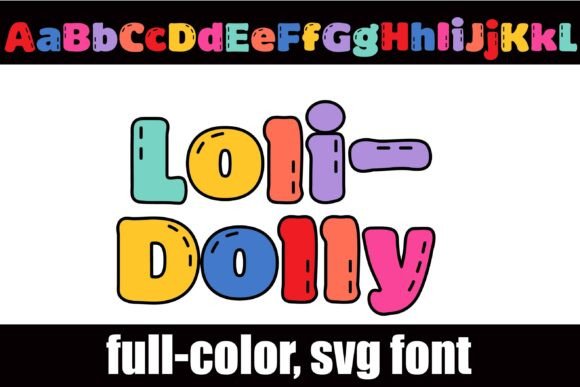
If you've ever wanted your text to feel less like typed characters and more like a handcrafted element, Loli-dolly is a font that makes that leap. This isn't your standard black-and-white typeface. It's a full-color, chunky sans serif font rendered in a vibrant rainbow palette, complete with charming little stitch marks that give it a tactile, almost textile-like quality. Think of it as a digital craft project you can type with.
What Exactly is Loli-dolly?
At its core, Loli-dolly is an OpenType full-color (SVG) font. This means the color and detail are baked directly into the font file itself. You don't need to add overlays or effects; when you type, you get a fully realized, multi-colored character. The "stitch marks" are a key part of its personality, suggesting a connection to quilting, embroidery, or toy design. It’s a creative font with a very specific, joyful vibe—playful, handmade, and unmistakably cheerful.
This font comes with an alt case of additional colors. You can access these alternate glyphs through your operating system's character map or, if you use Silhouette, directly through its glyph map. This feature essentially doubles your creative options, allowing you to mix and match color variations within a single word for a truly custom look.
Where Does This Rainbow Font Shine?
The unique aesthetic of Loli-dolly makes it a specialist. It's not the font for your body copy in a legal document, but it's a powerhouse for projects that need to inject instant personality. Its strength lies in grabbing attention and conveying a specific mood: fun, youthful, crafty, and approachable.
Branding & Packaging: Imagine a logo for a children's boutique, a craft brewery with a playful side, or a line of artisanal sweets. Loli-dolly can become the cornerstone of a brand identity that feels welcoming and memorable. On packaging design, especially for toys, stationery, or party supplies, it practically jumps off the shelf.
Marketing & Social Media: For social media graphics where stopping the scroll is everything, this font is a secret weapon. Use it for Instagram story headers, Facebook ad headlines, or YouTube thumbnails to instantly signal that your content is fun and engaging. It’s perfect for promoting sales, events, or new product launches with a burst of energy.
Digital & Editorial Design: While not for long-form reading, it's fantastic for web design callouts, podcast cover art, or e-commerce banners. In editorial design, think magazine pull quotes, chapter headings in a hobbyist publication, or the title of a scrapbooking layout. It adds a focal point of visual interest.
Crafting & Personal Projects: This is where Loli-dolly feels most at home. Crafters using software like Silhouette Studio or Cricut Design Space can use it to create stunning titles for scrapbook pages, custom stickers, greeting cards, and party decorations. Its vector-based nature means you can scale it for a tiny tag or a large poster without any loss of quality.
Using Loli-dolly Effectively: A Designer's Perspective
Choosing a premium font like this is just the first step. Using it well is what separates good design from great. Here’s some practical guidance.
Evaluate the Project Fit: Before you even install it, ask: does the playful, crafty, and youthful personality of Loli-dolly align with my project's message and audience? It's a poor fit for a corporate law firm, but an excellent one for a kids' yoga studio. The font itself communicates a tone.
Mastering Font Pairing: A display font as bold as Loli-dolly needs a complementary partner for any supporting text. It pairs beautifully with simple, clean serif fonts or neutral sans serif fonts. For example, use Loli-dolly for a headline and pair it with a font like Lato or Open Sans for body text. This creates a clear visual hierarchy and ensures readability. Avoid pairing it with another highly decorative script font or handwritten font, as they'll compete for attention.
Readability and Hierarchy: Because of its chunky, colorful nature, Loli-dolly is best used for short bursts of text—headlines, titles, logos, and single words. For longer sentences, legibility can decrease, especially at smaller sizes. Use it strategically to draw the eye, then let a plainer font handle the detailed information.
Installation and Compatibility: As an OpenType SVG font, you install Loli-dolly just like any .otf file, using FontBook on Mac or your preferred font manager on Windows. A crucial note: in programs that don't support color fonts, it will appear as a solid black silhouette. Even in compatible programs like Adobe Illustrator, Photoshop, Silhouette Studio, or Quark, it may show as black in the font preview window. The true colors will only render once you start typing on your canvas. Always test in your specific software before committing to a design.
Licensing for Commercial Use: If you're using Loli-dolly for client work, merchandise, or any project that generates revenue, ensure you have the correct commercial font license. This is a standard practice with any design asset. Review the license agreement that comes with your purchase to understand the terms for your specific use case.
In the world of modern typography, Loli-dolly