Pumpkin Puffs: A Layered Display Font for Halloween Designs
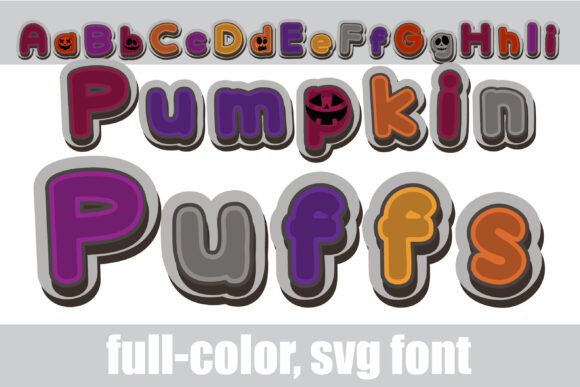
Finding a typeface that captures the specific energy of a season without looking cartoonish is a common challenge. Many seasonal fonts lean heavily into cliché, making professional design work feel childish. Pumpkin Puffs offers a sophisticated alternative. It is a full-color, layered display font designed with a Halloween palette, but its visual construction is rooted in modern typography trends. The font features a puffy, dimensional appearance that mimics 3D lettering. It is not merely a black outline; it is a fully rendered color font (SVG) that brings depth and texture to headlines immediately upon typing.
The Anatomy of a Modern Display Font
Understanding the technical makeup of Pumpkin Puffs helps in utilizing it effectively. As an OpenType full-color SVG font, it functions differently than a standard serif font or sans serif font. When you install the .OTF file, you are installing vector graphics that retain their color data. This means the letters appear with shading, highlights, and specific Halloween hues—think deep purples, vivid oranges, and slime greens—directly in your layout.
This technology allows for a "puffy" aesthetic that would typically require hours of manual layering in software like Illustrator. The personality of the font is playful yet bold. It commands attention, making it an ideal candidate for logo design or social media graphics where standing out is paramount. However, because of its decorative nature, it is strictly a display font. It is engineered for impact at large sizes, not for reading long paragraphs of body copy.
Compatibility and Color Rendering
A critical aspect of working with Pumpkin Puffs is understanding software compatibility. Not all design software can render color fonts. If you open this typeface in an older program or a non-compatible environment, it will default to a solid black version. While the black silhouette is functional, it loses the defining "puff" effect.
You will achieve the best results using modern design assets tools. Adobe Photoshop, Illustrator, and InDesign fully support full-color SVG fonts. Additionally, for the crafting community, Silhouette Studio is compatible, which is excellent news for those creating physical products like vinyl decals or paper crafts. QuarkXPress and Inkscape are also capable of rendering these colors. If you are using a Mac, installation via FontBook is standard, but always verify that your specific version of the software supports OpenType-SVG features before starting a project.
Strategic Applications in Branding and Marketing
When building a brand identity for a seasonal campaign, typography sets the tone. Pumpkin Puffs is versatile enough for various commercial applications, provided it is used with intent. Here is how to integrate this creative font into different workflows:
- Packaging Design: For food products, candy wrappers, or artisanal goods sold in October, the font creates an immediate shelf appeal. The "puffy" texture suggests volume and richness, which can subconsciously influence product perception.
- Event Marketing: Use Pumpkin Puffs for posters, flyers, and tickets for haunted houses, fall festivals, or corporate Halloween parties. Its high legibility at a distance makes it practical for signage.
- Digital Publishing: Bloggers and content creators can use this typeface for featured images or "Pin" graphics on Pinterest. The colorful nature of the font often increases click-through rates compared to standard text.
For entrepreneurs and small business owners, the font serves as a high-value asset. Instead of outsourcing header images for a Halloween sale, you can type out your message in a program that supports the font, export the image, and have a professional-grade graphic ready in minutes. This efficiency is crucial for time-sensitive marketing campaigns.
Typography Pairings and Visual Hierarchy
Because Pumpkin Puffs is a premium font with strong visual weight, it requires careful pairing to maintain balance. Placing it next to another decorative or handwritten font will result in visual clutter. Instead, contrast is your friend.
Balancing the Visual Weight
The best practice for editorial design or web headers using this font is to pair it with a clean, geometric sans serif font. A typeface like Montserrat, Roboto, or Open Sans provides a neutral resting place for the eye. When Pumpkin Puffs handles the headline, the sans serif can manage the sub-headers or body text.
Consider the visual hierarchy. If you are designing a poster, the event name should be in Pumpkin Puffs. The date, time, and location—while important—should be secondary. Using the display font for every piece of information makes the design unreadable. Reserve it for the hook.
Practical Guidance for Implementation
Before finalizing a design with Pumpkin Puffs, run a few standard checks. First, check the licensing. Most commercial font licenses allow for unlimited personal use and standard commercial use, but if you are creating a product for resale (like a t-shirt), ensure your license covers "print-on-demand" or "merchandise" usage.
Second, test the font in your specific environment. As noted, color fonts can sometimes appear black in the font selection preview window of compatible programs. You often need to type the text onto the canvas to see the colors render correctly. This is a quirk of SVG technology, not an installation error.
Finally, consider the "Alt" characters. The description of Pumpkin Puffs mentions an alternate version accessible via your system's character map. This is a powerful tool for logo design. If you have two instances of the letter 'O' in a word, using the alternate glyph for the second one can prevent the design from looking repetitive or robotic. It adds a hand-crafted feel to the final output.
By treating Pumpkin Puffs as a specialized tool rather than a general-purpose typeface, you can leverage its unique aesthetic to create memorable, high-impact designs that resonate with audiences during the autumn season.