Celebrate Every Design with Kawaii Dingbat Flair
More Than Just Symbols: A Designer's Secret Weapon
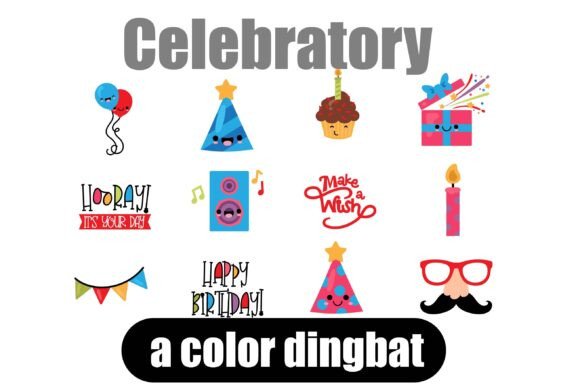
If you’ve ever spent hours scrolling for the perfect party icon, confetti graphic, or celebratory illustration, you know the friction it creates in a creative workflow. The Celebratory dingbat font is built to eliminate that friction. It’s a curated set of 26 kawaii-style, party-themed images packaged as a single typeface. Think of it as a tiny, on-demand illustration library that lives in your font menu.
Dingbats are often overlooked, but for working designers and creators, they’re a practical shortcut. Instead of juggling separate image files, you type a letter and a ready-to-use graphic appears. Celebratory offers cheerful, colorful motifs—balloons, streamers, party hats, gifts, and playful doodles—that inject instant personality into any project. The style is soft, rounded, and approachable, with a handcrafted feel that avoids looking generic.
Where This Font Truly Shines
Celebratory is a display-oriented dingbat, meaning it’s designed for impact at larger sizes rather than body text. Its strength lies in adding decorative accents, not conveying paragraphs of information. Here’s where it tends to work best:
- Invitations and Cards: Birthday invites, party flyers, save-the-dates, and thank-you notes benefit from its festive, friendly icons.
- Packaging and Labels: Add whimsical touches to product tags, sticker sheets, or box designs for artisanal goods, bakeries, or gift items.
- Social Media Graphics: Create eye-catching Instagram stories, celebratory posts, or highlight icons with a consistent, playful aesthetic.
- Newsletters and Digital Content: Break up text-heavy layouts with decorative dividers or accent graphics that feel cohesive and branded.
- Merch and Crafts: Design custom t-shirts, tote bags, or planner stickers with its cheerful, scalable vector graphics.
Because it’s an OpenType full-color SVG font, the icons render in vibrant color in compatible applications. This is a significant step up from traditional monochrome dingbats. However, compatibility matters. You’ll see the full-color version in programs like Adobe Illustrator, Photoshop, Silhouette Studio, Quark, and Inkscape. In unsupported software, the icons default to black silhouettes—still usable, but less dynamic. Always test in your intended workflow before committing to a large project.
Practical Integration and Design Considerations
Using a dingbat font effectively requires more than just dropping in icons. Here’s how to integrate Celebratory thoughtfully:
Font Pairing and Visual Hierarchy
Pair Celebratory with clean, neutral typefaces to let its personality stand out. A simple sans serif font like Montserrat or a soft serif font like Lora can provide balance. Avoid pairing it with other highly decorative or script fonts, which can create visual clutter. Use the dingbat icons as accents—think bullet points, section dividers, or small illustrative highlights—rather than competing with your main headlines.
Evaluating Project Fit
Not every project suits a kawaii style. Celebratory is ideal for brands or events that emphasize joy, celebration, and approachability. It might align well with a children’s party supply shop, a boutique bakery, or a lifestyle blogger. For a corporate finance report or a luxury minimalist brand, the aesthetic might feel misaligned. Always consider your audience’s expectations and the tone you want to set.
Readability and Scaling
Since these are illustrative glyphs, traditional readability metrics don’t apply. However, ensure the icons remain clear and recognizable at your intended size. Test at small scales (like in a crowded newsletter footer) and large scales (like on a poster). The SVG format retains crispness, but overly complex details can muddy at tiny sizes.
Licensing and Commercial Use
Confirm the font’s licensing terms for your specific use. Most premium fonts like Celebratory include commercial licenses for projects like merchandise, client work, and digital products. Always check whether the license covers the number of users or installations you need, especially if you’re working in a team or agency setting.
A Thoughtful Addition to Your Design Toolkit
Celebratory isn’t trying to be a workhorse text font. It’s a specialized tool for adding joyful, handcrafted flair where you need it. Its value lies in saving time, maintaining visual consistency, and injecting a bit of fun into otherwise standard layouts. For designers, marketers, and creators who regularly produce celebratory or playful content, it can become a reliable go-to asset.
Think of it as part of a broader design system. When used intentionally, a dingbat font like this can strengthen brand recognition—especially if you use its icons consistently across social media, packaging, and marketing materials. It turns simple graphics into a cohesive visual language that audiences will start to associate with your brand’s personality.
Ultimately, the best way to evaluate Celebratory is to experiment with it. Install it, test it in your preferred software, and see how its icons complement your existing design assets. Sometimes, the smallest details make the biggest difference in making your work feel polished, personal, and celebratory.