Elevate Your Designs with the Toon Town Color Dingbat Font
Sometimes a project doesn’t need a complex illustration or a full photo shoot to make an impact. Often, the most effective visual elements are the simplest ones—small, consistent icons that add personality and clarity. This is where a specialized asset like the Toon Town Color Dingbat Font becomes an invaluable part of a designer's toolkit. It’s not just a font; it’s a curated library of toon-style graphics ready to be deployed with a simple keystroke.
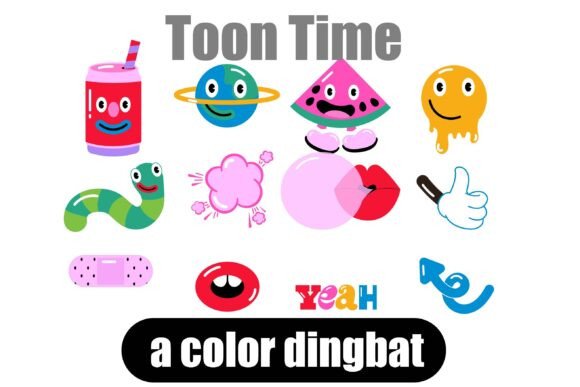
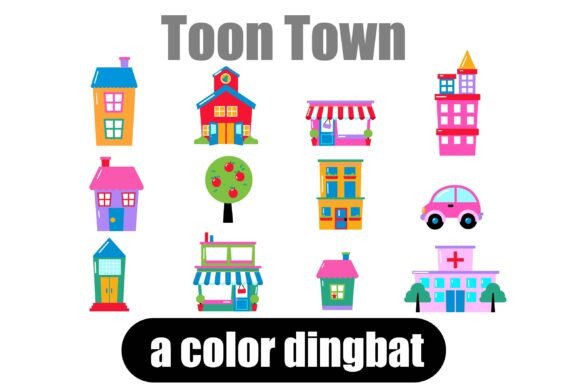
At its core, Toon Town is a premium font of the dingbat variety, but that description undersells its utility. Each of its 26 characters is a fully realized, color vector graphic depicting charming, cartoon-style urban elements. Think friendly buildings with quirky windows, rounded vintage cars, stylized street lamps, and whimsical city trees. The visual style is deliberately playful, with clean lines, soft curves, and a bright, appealing color palette. It evokes a sense of nostalgic fun and approachability, making it perfect for projects that aim to be welcoming, energetic, or family-friendly.
Where Toon Town Shines: Practical Applications
The real value of a creative font like Toon Town is its versatility. As a display font, its primary role is to grab attention, but its dingbat nature means it functions as a set of ready-made design assets. Consider these real-world uses:
- Branding & Logo Design: For businesses in childcare, education, family entertainment, or even a friendly neighborhood café, Toon Town icons can form the basis of a memorable logo or be used as supplementary brand marks on business cards and letterheads.
- Packaging Design: Imagine a line of children’s snacks or toys. Using Toon Town characters on the box as decorative elements or to indicate features (a car for "fast fun," a building for "playset") adds instant charm and visual storytelling.
- Marketing & Social Media Graphics: Create consistent, eye-catching Instagram stories, Pinterest pins, or Facebook ads. A toon building icon can denote a "store location" post, while a car graphic can highlight "delivery" or "new arrival" promotions.
- Publishing & Editorial Design: In magazines, newsletters, or blogs targeting parents or educators, these icons can break up text, highlight tips, or decorate section headers, improving readability and engagement.
- Crafting & Personal Projects: From party invitations and thank-you cards to custom t-shirt designs and scrapbooking, Toon Town provides a quick way to add professional-looking, themed graphics without advanced software skills.
Integrating Toon Town into Your Design Workflow
Adopting a new design asset requires more than just excitement; it demands practical integration. The first step is installation. As an OpenType full-color (SVG) font, Toon Town installs like any standard .otf file. Mac users can use FontBook, while Windows users can install it via the Control Panel or a preferred font manager.
A critical note on compatibility: color fonts will display as solid black in programs that don’t support the SVG format. They often appear black even in the font preview of compatible software. You’ll know your application supports it when the glyphs appear in color on your canvas. Currently, major design software like Adobe products (Photoshop, Illustrator, InDesign), Silhouette Studio, Quark, and Inkscape support full-color SVG fonts. Always test in your specific workflow before committing to a final project.
Evaluating Fit and Font Pairing
Not every project calls for a toon aesthetic. The key is evaluating fit. Toon Town works best where a sense of fun, whimsy, and approachability is desired. It would likely clash with the solemn tone of a corporate financial report but would excel in a kindergarten's newsletter or a toy store's branding.
When it comes to font pairing, balance is essential. Because Toon Town is a highly stylized display font, it should be paired with a clean, neutral sans serif font or a classic serif font for body text. This ensures readability while letting the dingbat characters stand out as decorative highlights. Avoid pairing it with other elaborate script fonts or handwritten fonts, as this can create visual chaos. The goal is to let Toon Town add flair without overwhelming the message.
Readability and Professionalism
While these are graphics, not letters, their impact on overall design professionalism is significant. Using them consistently reinforces brand recognition. A small icon used as a bullet point in a list or a divider between sections can make a layout feel more polished and intentional. However, moderation is key. Overusing dingbat fonts can make a design feel cluttered or childish. Use them as accents—sparingly and strategically—to guide the viewer's eye and inject personality without sacrificing clarity.
Commercial Licensing and Final Thoughts
Before using Toon Town in any commercial project, from client work to merchandise for sale, it is imperative to review the included license. Most premium fonts come with specific terms regarding commercial use, distribution, and modification. Ensure the license covers your intended application, whether it's for digital ads, printed packaging, or products sold online.
In the landscape of modern typography, tools like Toon Town represent a bridge between traditional typefaces and illustrative assets. They empower designers, entrepreneurs, and creators to quickly add a layer of visual storytelling and cohesion to their work. By understanding its strengths, testing its compatibility, and pairing it wisely, you can leverage this commercial font to create more engaging, memorable, and professional designs that truly connect with your audience.